
Who needs a mobile app can now build one with AI in 2026 — here’s what changed, which tools actually ship to the App Store, and how to go from idea to a live app without hiring a developer.
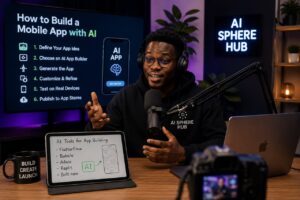
If you have an app idea and no coding background, 2026 is the easiest year in history to build one. What used to require a six-figure development budget and a twelve-month timeline can now be done by a solo founder, a student, or a small business owner, working with an AI agent that writes the code, wires the backend, and submits the finished app to the App Store and Google Play. This guide walks through why that shift happened, which tools actually deliver a native app versus just a browser-based one, and how founders in Nigeria and across Africa can use these tools to compete globally without a dev team.
In this guide:
1. Why 2026 is different for AI app building
2. Step-by-step: building your app with AI
3. Best AI app builders compared
4. If you want to keep the code
5. What it actually costs
6. Building from Nigeria and Africa
7. Common mistakes to avoid
8. FAQs

Why 2026 Is a Turning Point for AI App Development
For most of the last decade, “no-code” meant drag-and-drop builders that still demanded hours of manual screen-building. That changed once AI agents became capable of planning a build before writing anything, then working through design, data, and testing largely on their own. According to Gartner’s 2026 projection, roughly three out of every four new applications will be built with low-code or no-code tools by the end of the year, up from under a quarter in 2020.
The bigger shift is the move from AI tools that only generate web apps to tools that generate native apps. A native app is compiled code that installs directly on a phone. It can send push notifications, use the camera and GPS, and work offline and it’s the only kind of app that can be listed in the Apple App Store or Google Play, where the vast majority of mobile usage actually happens.
Native App vs. Web App: Why the Distinction Matters
Most AI “vibe coding” tools the ones built for fast prompting and iteration generate web apps that run in a browser and can be added to a home screen as a Progressive Web App (PWA). That’s fine for internal tools, but a PWA is not the same as a store-listed app: it can’t be submitted to Apple or Google, and some phone features behave inconsistently across browsers. If your goal is App Store or Google Play distribution, you need a builder specifically designed to ship native code.
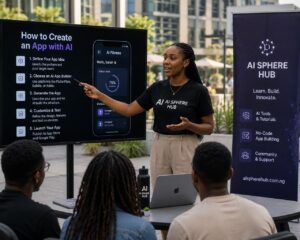
Step-by-Step: Building Your Mobile App With AI
Step 1: Define the App in One Clear Sentence
Before touching any tool, write down what your app does, who it’s for, and the core action a user takes. AI builders work from natural-language prompts, so a vague idea produces a vague app. A strong starting prompt names the user, the problem, and the main screens for example, a savings app for young professionals with a dashboard, a goal tracker, and a deposit flow.
Step 2: Pick a Builder Based on Your Output Goal
Decide upfront whether you need a native app, a web app, or both, since this determines which tool is worth your time. If App Store and Google Play listing is the goal, narrow to AI- native mobile builders rather than web-first “vibe coding” platforms.
Step 3: Generate the First Version
Describe your app in plain English inside the builder. The AI agent will plan the screens, generate the interface, set up a database, and configure basic logic like sign-in and data storage. Review the live preview on a simulated phone screen rather than just a desktop browser, since spacing and touch targets often look different on mobile.
Step 4: Refine With Follow-Up Prompts, Not From Scratch
Treat the first version as a draft. Give specific, incremental feedback “make the onboarding three screens instead of five,” “add a progress bar to the goal tracker” rather than restarting the whole prompt. Keep your screen count lean for an MVP: a list view, a detail view, a create-or-edit screen, and a profile screen is usually enough to test the idea.
Step 5: Add Native Features and Integrations
Once the core flow works, layer in device features like camera access, push notifications, or location, plus any AI-powered functionality such as chat support, recommendations, or content generation. Most builders let you connect a model provider like OpenAI or Anthropic’s Claude for these features.
Step 6: Test on Real Devices
Live preview inside the builder is not the same as testing on an actual phone with real network conditions. Install the build on your own device and, where possible, have a few target users
try it before submission.
Step 7: Submit to the App Store and Google Play
Native-first AI builders handle store submission directly, including the technical requirements Apple and Google check for. This step matters more than founders expect: Apple alone reviewed close to eight million app submissions in 2026, rejecting roughly a quarter of them, most often over privacy manifest issues, crashes, or missing privacy declarations for bundled libraries. Following your builder’s compliance checklist before submitting avoids a rejection
cycle that can cost you a week or more.
Quick gut-check before you build: if you can’t describe your app’s core action in one sentence, the AI-generated version won’t be able to either. Sharpen the idea first, the tool is not where clarity gets created.
Best AI App Builders in 2026, Compared
The market splits into three lanes: tools that ship native mobile apps, tools that generate web apps from prompts, and enterprise-focused platforms built for internal business tools. Here’s how the leading options compare for founders who want a real, distributable app.
If You Want to Keep the Code: AI Coding Agents
Not every builder wants a fully managed no-code platform. If you or a technical co-founder wants to own the codebase outright, AI coding agents like Claude Code, Cursor, and Replit’s agent mode can scaffold a React Native or Flutter app, write backend logic, and debug issues from natural-language instructions, while keeping the code portable and exportable at every step. This path takes more technical involvement but avoids platform lock-in, worth considering if your app is central to a long-term business rather than a quick test of an idea.
What Building an App With AI Actually Costs
- Free tier testing: most builders let you build and preview a small app at no cost.
- Paid plans: typically $20–$50 a month for a functioning app with a backend and store submission.
- Timeline: a simple MVP can go from idea to first user in three to fourteen days; a more complex app with integrations runs four to eight weeks.
- Comparison point: the same scope built by a traditional development team can take four to twelve months and cost tens of thousands of dollars.
- Building From Nigeria and Across Africa
Lagos has become one of the fastest-growing tech ecosystems globally, hosting close to a thousand startups and topping several 2026 “rising star” ecosystem rankings alongside cities like Mumbai and São Paulo. That momentum, combined with AI app builders removing much of the cost barrier to shipping, makes this a realistic moment for Nigerian and African founders to launch fintech, health-tech, ed-tech, or logistics apps without a large engineering team.
- Two local realities still shape how you should build:
1. Offline-first design matters. Unreliable power and inconsistent connectivity in many parts of Nigeria mean your app should cache data locally and sync gracefully rather than assuming constant internet access.
2. Payment integration is non-negotiable early. Wiring in a local payment processor (like Paystack or Flutterwave) from the start avoids a costly retrofit later, since Nigerian users expect mobile money and card options built for the local banking system.
If you’d rather work with a local team than a pure AI-builder path, Nigeria has a growing base of app development agencies in Lagos, Abuja, and beyond that combine AI-assisted workflows with human engineering oversight useful if your app needs compliance work (like CBN fintech guidelines) that an AI builder won’t handle on its own.
Common Mistakes to Avoid
- Over-scoping the MVP. Trying to generate ten screens and five integrations in the first prompt usually produces a messier result than four screens done well.
- Skipping real-device testing. A preview inside the builder is not the same as your app on a mid-range Android phone with patchy 3G.
- Ignoring store compliance early. Privacy manifests, permissions, and data-handling disclosures are common rejection reasons, check your builder’s compliance checklist before your first submission, not after a rejection.
- Assuming AI-generated means bug-free. AI agents handle a large share of the build, but a human review pass on data handling and edge cases is still worth the time before launch.
Frequently Asked Questions
1. Can I really build a mobile app with AI without knowing how to code?
Yes. In 2026, AI-native app builders let you describe an app in plain English and generate a working native iOS and Android app, complete with a database, authentication, and app store submission, without writing code.
2. How much does it cost to build a mobile app with AI in 2026?
Most AI app builders offer a free tier for testing, with paid plans starting around $20 to $50 a month. This is far cheaper than hiring a development team, which can cost thousands of dollars and take months.
3. What is the difference between a native app and a web app built with AI?
A native app is compiled code that runs directly on a phone and can be listed in the Apple App Store or Google Play. A web app runs in a browser and can be saved to a home screen, but it cannot be submitted to app stores unless wrapped separately.
4. How long does it take to build an app with AI?
A simple app with a handful of core screens can go from idea to first user in about three to fourteen days. More complex apps with custom workflows and integrations typically take four to eight weeks.
5. Can Nigerian and African developers build competitive apps using AI tools?
Yes. AI app builders remove much of the cost and time barrier that previously required a full development team, making it realistic for Nigerian founders to launch fintech, health, education, or logistics apps with a small team or solo, though offline-first design and local payment integration still need deliberate attention.
Written and researched by the AI Sphere Hub editorial team. AI Sphere Hub covers AI tools, models, and applications with a lens on both global developments and their relevance to Nigeria and Africa.
The Rise of Agentic AI and Multi-Agent Systems: What’s Actually Changing in 2026
Grok AI Explained: Elon Musk’s Chatbot, Features, Pricing & Real Use Cases